Once the scorecard is created, and prior to it being submitted, you can click on the ‘Active Scorecard’ within ‘Enter Score’ to can see an option to select “Menu”.
Following is a screenshot of scorecard menu options:
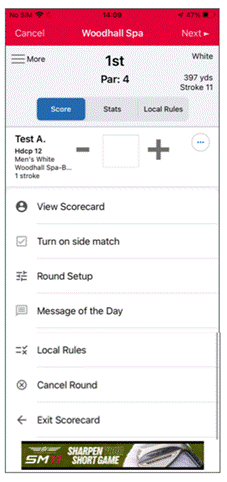
- View Scorecard: This takes to the completed scorecard (note: you can only see this when you have confirmed the 9 or 18 holes)
- Turn on side match: This is where you can switch over to a side match if you are playing a mini match between yourselves (NB: This will STILL be added to your Handicap Index)
- Round Setup: This gives you the option of going back and removing/adding a playing partner (or also turning a side match on/off)
- Message of the Day: This option is currently unavailable.
- Local Rules: This detail is recorded by each club and matches any specific local rules (during winter months) and those that are publicised and written on a scorecard.
- Cancel Round: This gives you the option to delete the round if set up in error
- Exit Scorecard: This takes you back to the “Scores” page
Was this article helpful?
That’s Great!
Thank you for your feedback
Sorry! We couldn't be helpful
Thank you for your feedback
Feedback sent
We appreciate your effort and will try to fix the article