Notification
Within the messages section this is where requests such a friend’s requests or score approval requests will be. Any new messages will flag up with a number above “messages”.
Note: The message function does not allow for text messages to be sent and received
IPHONE | ANDROID |
|
|
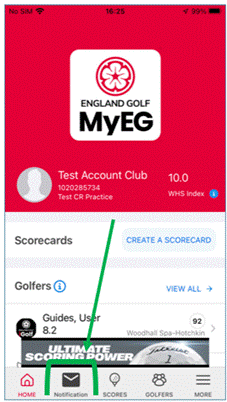
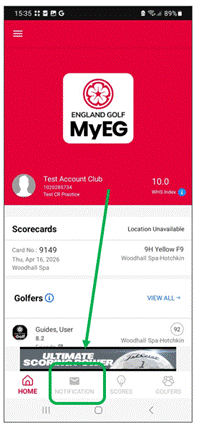
More
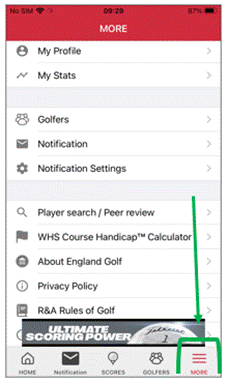
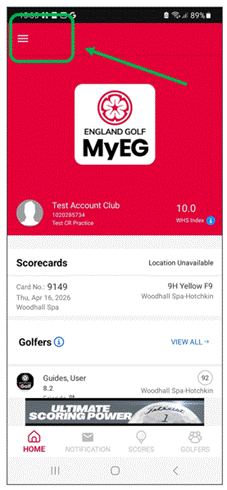
The “More” section is in a different place on an Android or iPhone. Following is a screenshot showing where to find it:
IPHONE | ANDROID |
|
|
IPHONE | ANDROID |
|
|
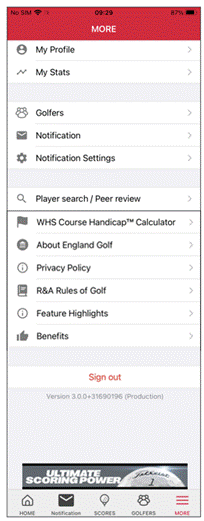
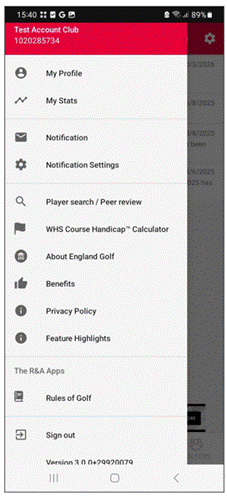
In “More” you can look at the following sections:
- My Profile > Edit Profile
- Within this section you can amend the following:
- Profile picture
- Email address
- Date of birth
- Note: This cannot be amended via the app. If this needs amending, and you are a club member, please speak with your home club. If you are an iGolf subscriber please contact iGolf direct.
- Mobile number
- Address
- View your home/secondary clubs.
- This cannot be changed in the app – please contact your club, or iGolf, to discuss further.
- Within this section you can amend the following:
- Change Password
- You can change your password here.
- Unregister
- Using this function allows you to de-activate your account within the app. Please note, this will not affect your club membership or subscription to iGolf but will prevent you accessing the app
- My Stats:
- This is a shortcut where you can view the stats you have saved for your rounds
- Golfers:
- This will take you to the “Golfers” and “Groups” section of the app
- Notification
- Shortcut to the messages section
- Notification Settings
- Notification for these areas can be toggled on/off.
- Information from England Golf about offers, news and other items that may be of interest to me
- Messages about news, events, and benefits
- New Friends
- Notification that you have been added as a new friend.
- Friend Activity
- Information relating to friends exceptional scores and activity.
- Comments on my scores
- Notification when friends comment on your scores.
- Information from England Golf about offers, news and other items that may be of interest to me
- Notification for these areas can be toggled on/off.
- Player Search/Peer Review
- Area used when wanting to see player’s results.
- You can only see full details of your friends or members of your home club. Outside of that you will only see the players handicap index. See “Can I hide My Scores”
- Area used when wanting to see player’s results.
- WHS Course Handicap™ Calculator
- Area used when wanting to understand your course handicap at any affiliated club and the course handicap of any other golfer by changing the handicap index value at the top of the screen.
- You can also look at your “Golfers” Course Handicap™.
- About England Golf
- Link to England Golf website
- Privacy Policy
- Link to the England Golf privacy policy
- R&A Rules of Golf
- Link through to the R&A “Rules of Golf”.
- Feature Highlights
- Link to show you some of the features of the app
- Benefits
- Link through to benefits
- Sign Out
- Area to log out of the app.
- App version
- Confirms the version you are using.
Was this article helpful?
That’s Great!
Thank you for your feedback
Sorry! We couldn't be helpful
Thank you for your feedback
Feedback sent
We appreciate your effort and will try to fix the article